Reverse Engineering Conflict of Nations
Reverse Engineering Conflict of Nations
Introduction: What is Conflict of Nations?
Conflict of Nations is an online real-time strategy game where up to 100 players compete to rule the world. In 1x mode a game takes up to 3–4 months, while in 4x mode a game takes up to 1 month. While playing the game, I became curious about how the economics work in Conflict of Nations. To fulfill my desire after knowledge, I reverse engineered parts of the game. In this post I’ll show how the game works by inspecting the browser client and analyzing the JSON data exchanged with the server.
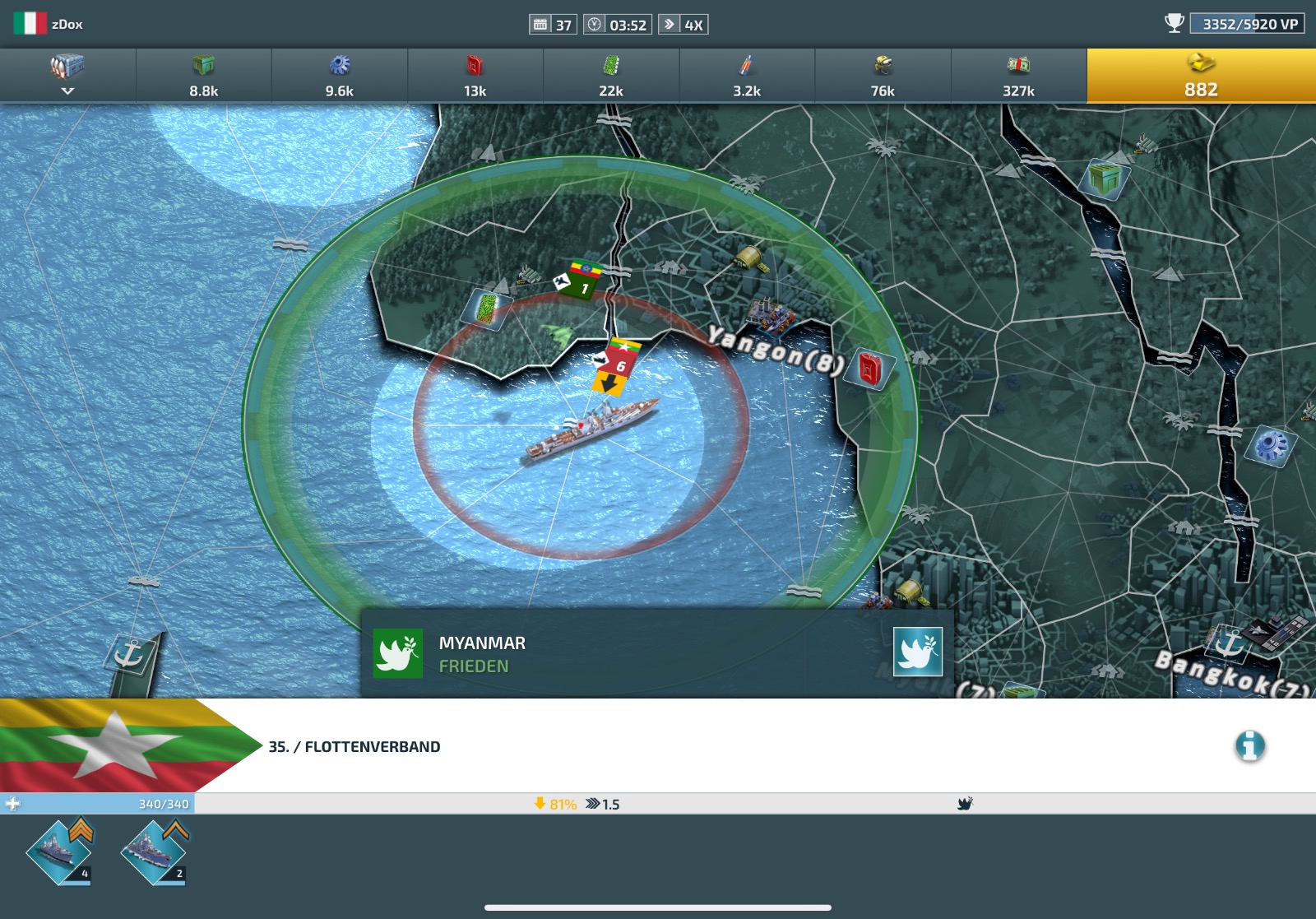
At the start of the game, each player chooses a nation. Afterward, they can perform many actions, such as constructing buildings in land provinces. In the screenshot above, for example, an Army Base was built in Yangon and an Airport in Bangkok. Each city produces a single resource (e.g. Yangon produces fuel). A unit can be mobilized in a city if: the city meets the production requirements for that unit type, the player has researched it and the player has enough resources. There is a vast variety of unit types: airplanes, ships, tanks, missiles and more. In the top right corner of the screenshot, you can see the win condition, which is to have reached a certain number of victory points. Each controlled province gives victory points.
Inspecting the network traffic
There are many clients (mobile, desktop via Steam or web) that talk to the server, so we have several ways to reverse engineer the game.
The easiest way to understand the game client is to inspect the network requests it sends to the server. The browser developer tools make this easy.
 Opening the network requests, filtering for XHR requests and sorting by size reveals two interesting requests:
- congs16.c.bytro.com/
This request goes to the game server (the 16 is the server ID). The response is a JSON object containing the game state, which is dynamic data that changes during the game.
- static1.bytro.com/fileadmin/mapjson/live/12365_5.json
This request goes to the static data server (12365_5 is the map ID). The response is a JSON object containing the map data that doesn’t change during a game. I’ll call this the static map data.
Game State
The game state is a JSON object containing the game state.
{
  "@c": "ultshared.rpc.json.UltJsonResult",
  "result": {
    "@c": "ultshared.UltGameState",
    ...
    "states": {
      "1" : {
        "@c": "ultshared.UltPlayerState",
        ...
      },
      "3": {
        "@c": "ultshared.UltMapState",
        "stateType": 3,
        "stateID": "5500730255880",
        "timeStamp": "1773578227366",
        "map": {
          "@c": "ultshared.UltMap",
          "isReduced": true,
          "version": 5,
          "mapID": "12365_5",
          "dayOfGame": 1,
          "width": 15393,
          "height": 6566,
          "usePopulation": false,
          "useMinimalLocalization": false,
          "localizedPlayerProfiles": false,
          ...
        }
      },
      ...
    }
  }
}
Note: If you want to view the complete game state, you can download it from here.
The game state contains many states, for example the player state, the map state and the army state. The player state has a dictionary of all the player profiles and coalitions (referenced by teams in the JSON data). The map state is especially interesting, as it has a list of all the provinces.
Static Map Data
Downloading and opening the static map data reveals a lot of information.
{
  "isReduced": false,
  "version": -96,
  "mapID": "12365_5",
  "dayOfGame": 0,
  "width": 15393,
  "height": 6566,
  "usePopulation": false,
  "useMinimalLocalization": true,
  "overlapX": 600,
  "locations": [
    "java.util.ArrayList",
    [{
      "@c": "ultshared.UltSeaProvince",
      "id":	1,
      "ed":	0,
      "hst": 0,
      "pal": 0,
      "c":	{ "x": 7891, "y": 1774 },
      "b": "HuMG3x7eBuce3Abq...",
      "tt": 20,
      "bt":	"AAAAAAAAAQEBAAAAAAAA",
      "bn": ["..."]
    }]
  ],
  "connections": "AAADYwAMmDgAAjO...",
  "connections_v2": "AAADYwAAAAAAD...",
  "populationFactor": 40,
  "triangulations": {
    "borderTriangulations": ["..."],
    "precision": 16,
    "provinceIds": [
      2,
      6,
      7,
      "..."
    ],
    "provinceBounds": [
      135776,
      41664,
      136576,
      42208,
      "..."
    ],
    "mapBounds": {
      "minX": 4,
      "minY": -36,
      "maxX": 248560,
      "maxY": 100141
    },
    "safeRegion": {
      "minX": 1592,
      "minY": -36,
      "maxX": 250865,
      "maxHeight": 21307
    },
    "version": 2
  }
}
Note: If you want to view the complete static map data, you can download it from here.
Hmm, that’s a lot of data and many abbreviations!
Understanding the JSON structure
After reading the game state and the static map data, we can map some key–value pairs to attributes of game objects, but many remain unknown.
To make sense of the data, we need to see what the browser does with it. That’s where the JavaScript comes in: specifically main-built-min.js at www.conflictnations.com/clients/con-client/con-client_live/js/main-built-min.js, which is about 180k lines. It’s large, but search is your friend.
We saw UltProvince earlier, so let’s search for it. After a few minutes, we find something like this:
 d.UltProvince.prototype.applyData = function (a) {
      this.name = void 0 === a.n ? '' : a.n;
      this.productionType = void 0 === a.r ? 0 : a.r;
      a.b &&
      (
        this.border = this.decodeBorder(a.b),
        this.extraBorders = a.xb || null,
        this.capital = lzr.engine.geom.Point.toPoint(a.c),
        this.terrainType = a.tt || null,
        this.coastal = a.co || !1
      );
      a.bt && (this.borderTypes = lzr.utils.Base64Binary.decode(a.bt));
      this.borderNeighbours = a.bn || null;
      this.setLocationID(void 0 === a.id ? 0 : a.id);
      this.setOwnerID(void 0 === a.o ? - 1 : a.o);
      this.legalOwnerID = a.lo || a.o;
      this.setUpgrades(a.us);
      this.morale = void 0 === a.m ? 70 : a.m;
      "..."
    };
That’s a gold mine. The table below maps the JSON abbreviations to UltProvince attributes:
| Abbreviation | Attribute |
|---|---|
n | name |
r | productionType |
b | border (decoded) |
xb | extraBorders |
c | capital (point) |
tt | terrainType |
co | coastal |
bt | borderTypes (Base64 decoded) |
bn | borderNeighbours |
id | locationID |
o | ownerID |
lo | legalOwnerID |
us | upgrades |
m | morale |
We only need to repeat this for the other objects in the game state. You should not underestimate the number of game objects in the game state. It took a friend of mine and me quite a while to map everything and after you have a good structure, they tend to update the client version every few weeks. Hence, you then need to update parts of the mapping.
How does the client request actions?
Simply perform an action in the browser and inspect the network requests.
As an example, I am going to send the airplane to patrol over the city of Hargeisa.
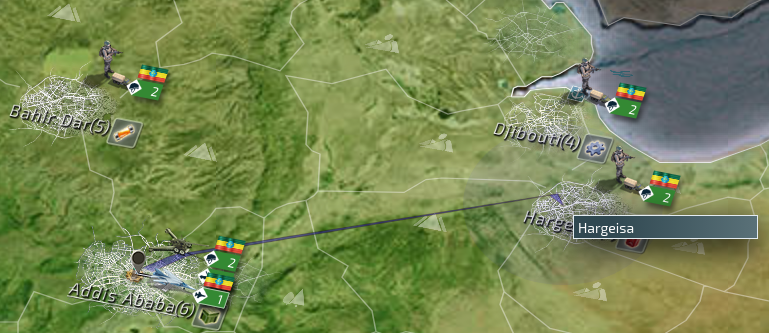 We can see that the action is sent to the server as a POST request with the following body:
{
  ...
  "actions": [
    "java.util.LinkedList",
    [
      {
        ...
        "@c": "ultshared.action.UltArmyAction",
        "armies": [
          "java.util.LinkedList",
          [
            {
              "@c": "a",
              "id": 17000007,
              "s": 1,
              "o": 86,
              "l": 32,
              "p": {
                "x": 8409,
                "y": 3697
              },
              "ld": null,
              "os": false,
              "u": [
                "[Lultshared.warfare.UltUnit;",
                [
                  {
                    "@c": "u",
                    "t": 3373,
                    "aa": true,
                    "os": false,
                    "id": 287146984,
                    "h": 1,
                    "s": 1,
                    "k": 0
                  }
                ]
              ],
              "c": [
                "java.util.LinkedList",
                [
                  {
                    "@c": "pc",
                    "targetPos": {
                      "x": 8629.5,
                      "y": 3653.25
                    },
                    "approaching": true,
                    "type": "Guard",
                    "airField": null
                  }
                ]
              ],
              "au": -1,
              "ap": {
                "x": 8625,
                "y": 3657
              },
              "ag": 0,
              "fm": 0
            }
          ]
        ]
      }
    ]
  ],
  ...
}
So patrolling over the city of Hargeisa results in a ArmyAction being sent.
The ArmyAction is a list of armies and for each army the new command is set. You can use the same approach for all other actions.
Conclusion
By inspecting the browser network traffic and analyzing the JavaScript client, we can reconstruct much of the internal data model of Conflict of Nations.
This allows us to build tooling around Conflict of Nations, which opens another dimension of possibilities.
In future posts I will show how this information can be used to build a sophisticated replay format, replay viewer and a scalable replay recording pipeline.